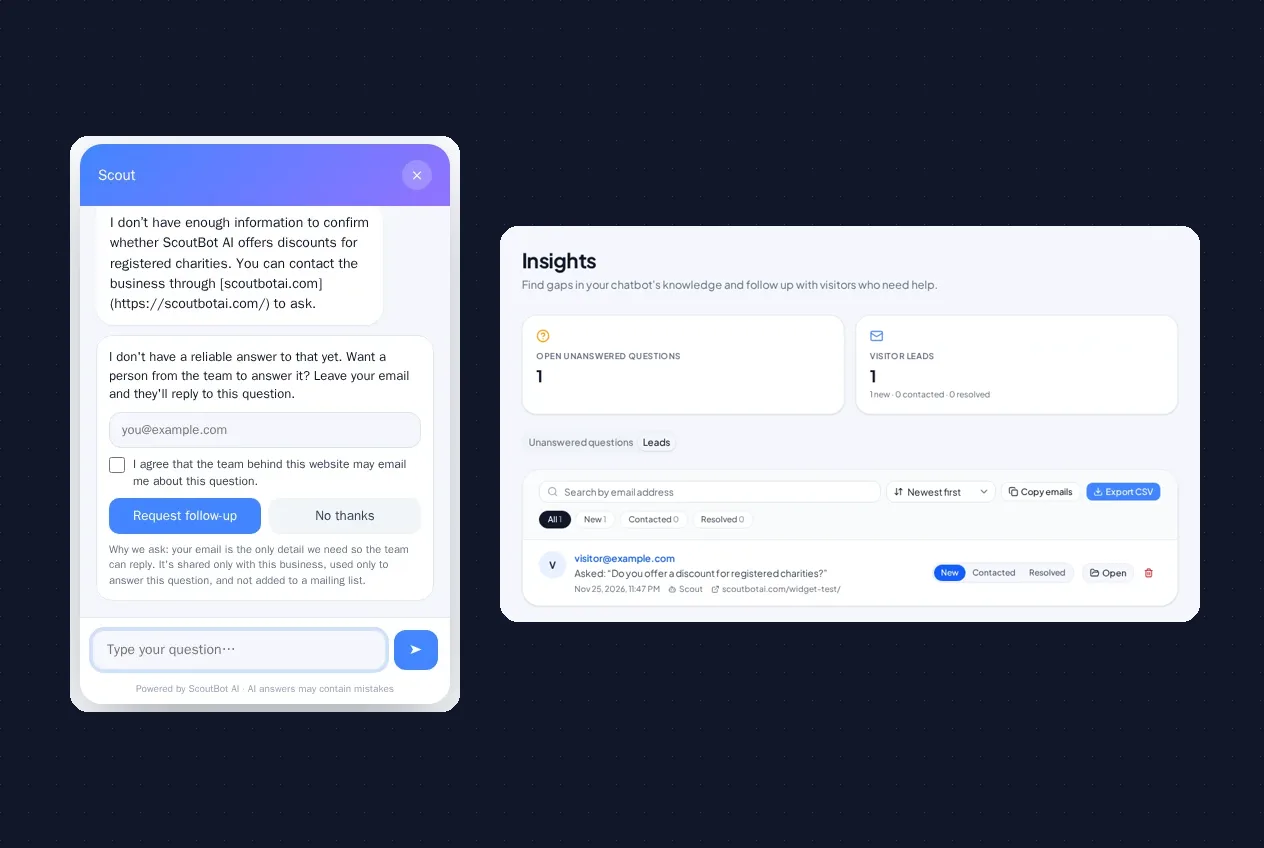
Every AI chatbot eventually gets a question it can't answer. Someone asks whether you can deliver on a Sunday, whether you work with charities, or whether a product fits a model you don't list. What happens next decides whether that visitor becomes a customer or closes the tab.
A poorly designed chatbot either guesses, which risks giving wrong information, or hits a dead end, which loses the enquiry. A well-designed one does neither. It says honestly that it doesn't know, offers a clear next step and, if the visitor chooses, collects just enough contact information for a person to reply.
This guide explains how AI chatbot lead capture should work when the chatbot can't answer: what to collect, how to word the request, how to follow up and how to handle the data responsibly. It ends with exactly what ScoutBot AI does today, shown in real screenshots, and what it doesn't.
Key takeaways
- An unanswered question is often a high-intent enquiry: the visitor wanted something your website didn't tell them.
- Never let the chatbot invent missing information. Admit the gap, then offer a next step.
- Ask only for what you need to reply, usually just an email address, and say why you're asking.
- Reply quickly, then add the answer to your website or chatbot so the next visitor doesn't need to ask.
- Treat contact details as personal data: get consent where required, store them securely and delete them when you no longer need them.
Why AI chatbots sometimes can't answer
A chatbot trained on your own content can only answer what that content covers. Questions go unanswered for predictable reasons:
- The information isn't written down anywhere. "Do you offer student discounts?" may have an answer in your head, but not on your website.
- The question is specific to the visitor. "Can you fit a kitchen in a 1930s house with uneven walls?" needs a person's judgement.
- The page wasn't indexed. Most chatbots have page or document limits, and some pages may be missing.
- The content is ambiguous or outdated. Two pages give different delivery times, so a careful chatbot won't pick one.
Each of these is a signal, not just a failure. Unanswered questions show you what customers want to know and your website doesn't say. If you're new to how website-trained chatbots find answers, our guide to chatbots trained on your own website content explains it step by step.
Why a chatbot should never invent missing information
Language models are designed to produce fluent text, and without guardrails they can fill a gap with something plausible but wrong: a discount you don't offer, a delivery date you can't meet. For a small business, that creates real problems:
- customers act on the answer and are disappointed or out of pocket;
- you may be held to what your website told them. In 2024 a Canadian tribunal held Air Canada responsible for wrong information its chatbot gave a customer (Moffatt v. Air Canada);
- trust in the chatbot, and in your business, drops.
The fix is to answer only from your content and to treat "I don't have that information" as a correct answer. The rest of this article is about what to do after that sentence.
What should happen when a chatbot doesn't know the answer?
A good fallback does five things, in this order:
- Recognise the gap. Detect that the content doesn't support an answer.
- Say so plainly. "I don't have reliable information about that" is better than a vague reply.
- Offer a next step. A person can answer, by email, phone or a contact form.
- Let the visitor choose. Collect contact details only if the visitor opts in, with a visible "No thanks".
- Set expectations. Say who will reply and what the details will be used for.
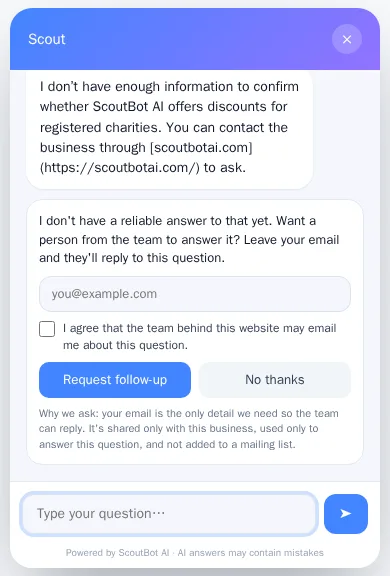
Here's how that looks in practice. The screenshot below is the real ScoutBot widget on a plain test page, trained on scoutbotai.com. We asked it something our website doesn't cover.
How to turn unanswered questions into potential leads
Someone who asks a specific question about your services is usually further along than a casual browser. Turning that moment into an enquiry is less about sales tactics and more about removing friction:
- Offer the follow-up at the moment of the gap, not as a pop-up the second the visitor arrives.
- Keep the visitor's question attached to the lead. Nobody wants to retype it into a contact form.
- Record the page they were on. A question asked on your pricing page means something different from one on your careers page.
- Make it one step. An email field and a consent checkbox beat a seven-field form.
- Reply fast. The value of the lead fades quickly. Same day is a good target for a small business.
What information should a chatbot collect?
Collect the minimum you need to answer the question. Data minimisation, using only personal data that is adequate, relevant and limited to what's necessary, is one of the core principles of the GDPR (European Commission: principles of the GDPR).
| Detail | Ask for it? | Why |
|---|---|---|
| Email address | Yes | Enough to reply to the question |
| The question itself | Yes, automatically | The reason for the follow-up |
| Page the question was asked on | Yes, automatically | Context for your reply |
| Name | Optional | Friendlier reply, but not necessary |
| Phone number | Only if you'll actually call | Extra data means extra responsibility |
| Budget, company size, timeline | Usually not in a chatbot fallback | Qualifying questions belong in the reply, not the form |
| Health, financial or other sensitive details | No | Special category or sensitive data needs much stronger safeguards |
How to design a good fallback conversation
Wording matters as much as the form. Compare these two illustrative fallbacks for a fictional bike shop when a visitor asks about repairing a rare e-bike motor.
| Weak fallback | Strong fallback |
|---|---|
| "Sorry, I can't help with that. Please contact us." | "I don't have information about repairs for that motor. Would you like someone from the workshop to reply? Leave your email and they'll answer this question." |
| Form asks for name, email, phone, address and a message | One email field, a consent checkbox and the question already attached |
| No explanation of how the data is used | "Your email is only used to answer this question and isn't added to a mailing list." |
| No way to decline | A clear "No thanks" button |
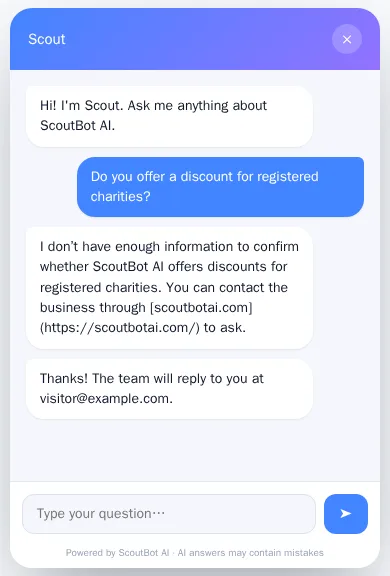
| Nothing after submitting | "Thanks! The team will reply to you at alex@example.com." |
Also decide where the fallback shouldn't appear. If a visitor reports an emergency or a safety issue, the chatbot should point them to your phone number or the appropriate emergency service straight away, not to a form.
How businesses should follow up with chatbot leads
- Reply to the question first. Answer what they asked before mentioning anything else.
- Use the context. Mention the page they were on and their exact question.
- Track status. Mark each lead as new, contacted or resolved so nothing is answered twice or forgotten.
- Close the gap. Add the answer to your website or chatbot knowledge so the next visitor gets it instantly.
- Don't add people to marketing lists unless they separately agreed to it.
Examples for ecommerce, service businesses and professional services
All three examples are fictional and illustrative.
Ecommerce: an online tea shop
Visitor: "Can you ship to Norway before Christmas?" The shipping page lists EU countries only. Chatbot: "I don't have information about shipping to Norway. Would you like the team to check and email you?" The owner replies the same afternoon and adds a line about non-EU shipping to the delivery page.
Service business: a local electrician
Visitor: "Do you install EV chargers in flats with shared parking?" The services page mentions EV chargers but not shared parking. Chatbot: admits it can't confirm, offers a follow-up. The electrician replies with the questions they'd need answered for a quote.
Professional services: a small accounting firm
Visitor: "Can you help with a late tax return from three years ago?" The site covers current-year returns. Chatbot: says it can't confirm and offers a follow-up, without commenting on the visitor's tax position. The firm replies and books a call.
Privacy, consent and responsible data collection
Capturing a lead means processing personal data, so treat it seriously. This is general information, not legal advice; check your own obligations, particularly if you operate in Europe.
- Minimise: collect only what you need to reply (see the table above).
- Explain the purpose at the point of collection: who will contact the visitor, about what, and that the email won't be used for anything else. Under the GDPR, people must be told the purposes of processing and their rights (European Commission).
- Get consent where required: an unticked checkbox the visitor actively ticks is a clear signal. Consent must be freely given, specific, informed and unambiguous (GDPR, Articles 4(11) and 7).
- Secure it: limit who can see leads and use a provider with access controls.
- Retain and delete sensibly: once the question is resolved and no longer needed, delete it. Individuals have rights to access and erasure (EDPB: respecting individuals' rights).
- Update your privacy notice to mention the chatbot and the follow-up form. The EDPB's data protection guide for small businesses is a practical starting point.
How ScoutBot handles questions it can't answer
Here's what ScoutBot AI does today, verified against the product, and what it doesn't.
In the chat: ScoutBot answers only from your website pages, documents and text. When the information isn't there, it says it doesn't have enough information rather than guessing. If lead capture is switched on (it's a setting in the Chatbot Builder, on by default), it then shows a short form: an email field, an unticked consent checkbox ("I agree that the team behind this website may email me about this question"), Request follow-up and No thanks buttons, and a note explaining that the email is only used to answer the question and isn't added to a mailing list.
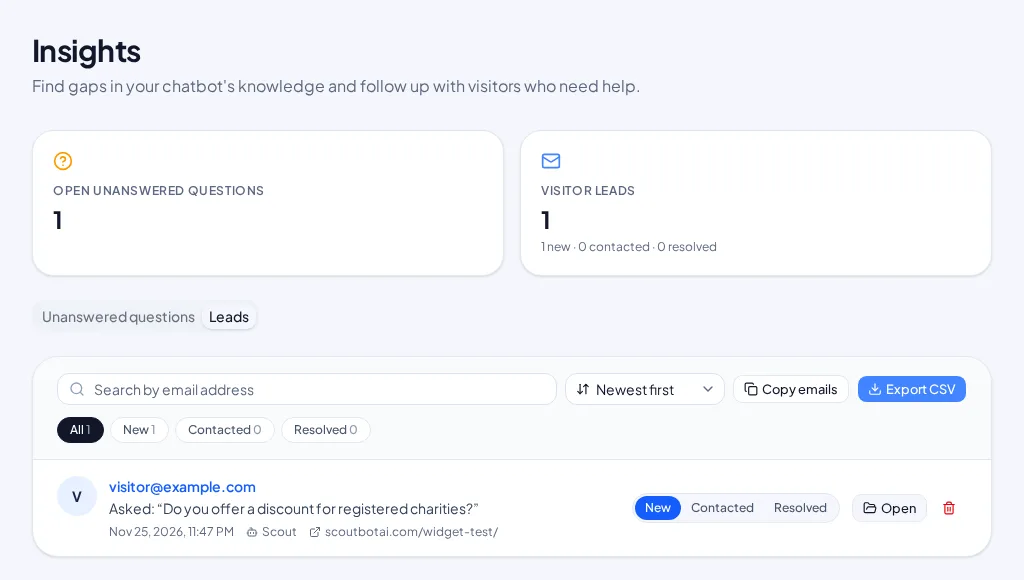
In your dashboard: unanswered questions are listed under Insights, and each follow-up request becomes a lead with the visitor's email, their question, the page they asked it on and the date. A notification appears in the dashboard's bell icon. In the leads inbox you can search, filter by status (new, contacted, resolved), copy emails, export to CSV and delete leads.
Opening a lead gives you three tools: Answer and resolve, where you write the correct answer and ScoutBot adds it to the chatbot's knowledge so future visitors get it; a reply draft you can edit and copy into your own email; and private notes.
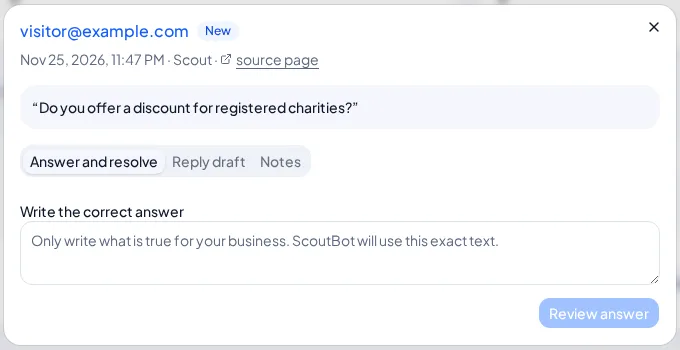
What ScoutBot doesn't do: it doesn't send email notifications about new leads (they appear in the dashboard only), doesn't send replies for you (you reply from your own email), doesn't connect to CRMs, and its form collects an email address only, not names or phone numbers. It's not a live chat tool, so nobody from your team joins the conversation in real time. It also doesn't make legal compliance decisions for you: you remain responsible for your privacy notice and how you use the data.
Choosing between chatbots on this point? Our small business chatbot buying guide compares lead capture and handover across ScoutBot, Chatbase and Tidio, and our WordPress installation guide shows how to get the chatbot on your site.
Frequently asked questions
What is AI chatbot lead capture?
It's when a chatbot collects a visitor's contact details so the business can follow up, for example after the chatbot couldn't answer a question. Done well, it's optional, explains why the details are needed and collects only what's necessary.
What should a chatbot do when it doesn't know the answer?
Say clearly that it doesn't have the information, avoid guessing, and offer a next step such as a follow-up by email or your contact details. The visitor should be able to decline.
Can a chatbot collect email addresses?
Yes, many can. Ask only when there's a clear reason, such as replying to an unanswered question, explain how the email will be used, and get consent where required.
Is it legal to collect leads through a chatbot in Europe?
It can be, provided you follow data protection rules such as the GDPR: have a lawful basis, inform people of the purpose, collect only what's necessary, keep it secure and delete it when it's no longer needed. Get legal advice for your specific situation.
How many questions should a chatbot ask a lead?
As few as possible. For a follow-up on an unanswered question, an email address is usually enough because the question is already captured.
How fast should I follow up on chatbot leads?
As soon as you reasonably can; same day is a good target for a small business. The visitor asked because they wanted to decide something.
Do chatbot leads replace a contact form?
No. Keep your contact form for visitors who prefer it. A chatbot fallback catches people at the moment the chatbot couldn't help them.
Does ScoutBot send me an email when a lead comes in?
No. New leads appear in the ScoutBot dashboard's leads inbox, with a notification in the dashboard. Check it regularly, or export leads to CSV.
Can ScoutBot learn from the answers I give to leads?
Yes. When you use Answer and resolve on a lead, ScoutBot adds your answer to the chatbot's knowledge so future visitors asking the same question get it directly.
Can I turn off lead capture in ScoutBot?
Yes. It's a setting in the Chatbot Builder. With it off, the chatbot still says when it can't answer but doesn't offer the follow-up form.
Don't let an unanswered question end the conversation
The best AI chatbot lead capture isn't aggressive. It's honest: the chatbot admits what it doesn't know, offers a person instead, asks for one detail with a clear reason, and the business replies quickly and closes the gap. If you want a chatbot that works this way on your website, ScoutBot AI answers from your own content, offers an optional follow-up form when it can't, and collects the questions in a leads inbox. You can try it with 20 free responses.
Sources
- European Commission: Principles of the GDPR
- Regulation (EU) 2016/679 (GDPR), EUR-Lex
- European Data Protection Board: Respecting individuals' rights
- European Data Protection Board: Data protection guide for small business
- Moffatt v. Air Canada, 2024 BCCRT 149
Product details reflect ScoutBot AI as of November 25, 2026. Pricing and limits are shown on the pricing section of our homepage.
Related article
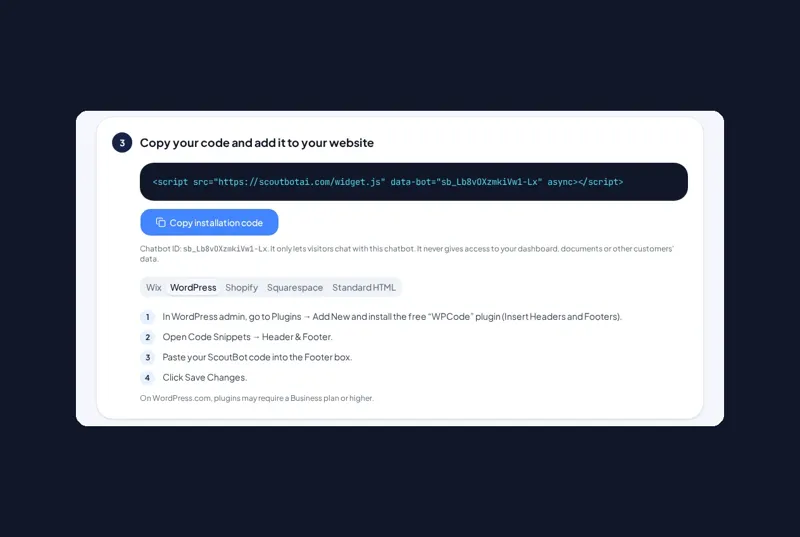 How to Add an AI Chatbot to WordPress Without CodingStep-by-step: add an AI chatbot trained on your own content to a WordPress or WooCommerce site without writing code, with real screenshots, three install methods and fixes for common problems.