Searching for the best AI chatbot for a small business website gives you dozens of "top 10" lists, most of them ranking tools by features you'll never use. A small business rarely needs the most powerful chatbot. It needs one that answers its customers' real questions correctly, installs without a developer and costs a sensible amount each month.
This is a buying guide, not a ranking. It explains what separates a good small business chatbot from an expensive distraction, gives you a checklist to test any tool against, and compares three common choices: ScoutBot AI (our own product), Chatbase and Tidio, with prices checked on November 25, 2026. If you want a wider field, our side-by-side comparison of seven chatbot platforms covers Crisp, tawk.to, Intercom and Botpress as well.
Key takeaways
- The best chatbot for a small business is the one that fits your questions, channels and budget, not the one with the longest feature list.
- Check where answers come from: a chatbot trained on your own website and documents, with source links, is easier to trust and check.
- Compare included usage (responses, credits or conversations), not only the headline price, and note whether the price shown is monthly or billed annually.
- Decide early whether you need live chat with your staff. If you do, choose a live chat platform with AI; if you don't, a focused website assistant usually costs far less.
- Test any tool with 10–20 real customer questions before paying.
Disclosure: ScoutBot AI publishes this guide and ScoutBot is our product. Competitor information comes from their official websites and pricing pages; we haven't run side-by-side tests of competitors' answer quality.
What makes a good AI chatbot for a small business?
Large companies buy chatbots to deflect thousands of tickets across many channels. A small business has a different job to do: answer the same handful of questions quickly, at any hour, without the owner having to reply every time. A good small business chatbot therefore does four things well.
- It answers from your information. Opening hours, prices, delivery areas and policies should come from your website and documents, not from the model's general knowledge. That's the main idea behind an AI chatbot trained on your website content.
- It admits when it doesn't know. A chatbot that invents a refund policy is worse than no chatbot. Look for one that says it doesn't have the information and offers a next step.
- It's easy to keep accurate. When your prices change, you should be able to update the source and re-index in minutes, not rebuild conversation flows.
- Its cost matches your volume. A local business with a few hundred visitors a week doesn't need a plan priced for a support department.
Everything else, from integrations to analytics dashboards, is useful only if it serves one of these four.
Features to look for before you buy
Use this checklist when you look at any chatbot's website or free trial. It's ordered roughly by importance for a typical small business website.
| Feature | What to check | Why it matters |
|---|---|---|
| Training sources | Website pages, PDFs, pasted text; page and file limits | Your answers already exist in these places |
| Source links | Does each answer show where it came from? | Visitors and you can check answers quickly |
| Fallback behaviour | What happens when it doesn't know | Prevents invented answers and lost enquiries |
| Usage limits | Responses, credits or conversations per month, and what happens at the limit | Determines your real cost per answer |
| Installation | One-line embed, WordPress/Wix/Shopify instructions or plugin | Decides whether you can set it up yourself |
| Customization | Name, welcome message, tone, colour | The chatbot should feel like part of your site |
| Conversation history | Can you read what visitors asked? | Shows missing information and recurring questions |
| Lead capture | Can visitors leave contact details, with consent? | Turns unanswered questions into follow-ups |
| Human handover | Live chat to staff, or a contact route | Essential for complaints and complex requests |
| Privacy and data | Where data is processed, deletion options, privacy policy | You're responsible for your visitors' data |
Two of these deserve a closer look. Fallback behaviour is the feature most buyers forget to test, and it's where cheap and expensive chatbots alike can fail. We cover it in depth in how AI chatbots capture leads when they can't answer. Human handover splits the market in two: tools built around live chat with your team, and tools built to answer on their own. Know which one you need before you compare prices.
ScoutBot vs Chatbase vs Tidio: a dated comparison
These three tools are often shortlisted by small businesses, but they're built for different jobs. ScoutBot is a focused website assistant, Chatbase is an AI agent platform with a broad feature set, and Tidio combines live chat with its Lyro AI agent. Prices were checked on the official pricing pages on November 25, 2026. Vendors change plans often, so confirm before you buy.
| Category | ScoutBot AI | Chatbase | Tidio |
|---|---|---|---|
| Built for | Small business websites that want answers from their own content | Businesses building AI agents on their data, with room to grow | Small online stores and teams that also chat with customers live |
| Entry price (monthly billing) | $7.77/month (Starter) | Basic: $150/month | Starter: $33/month |
| Annual billing | Not offered; monthly only | Basic: $120/month billed annually | Starter: $390/year |
| Free option | 20 free AI responses for new accounts | No free plan listed on the pricing page we checked | Free plan with 50 lifetime Lyro AI conversations; 7-day trial of paid plans |
| Included usage | Up to 300 AI responses/month | 4,000 message credits/month on Basic | Starter lists 50 AI + human conversations/month |
| Training sources | Up to 25 website pages, 5 PDF/TXT documents, pasted text | Websites, files and text (storage-based limits) | Lyro answers from your knowledge sources and website content |
| Installation | One-line embed code; guides for WordPress, Wix, Shopify, Squarespace, HTML | Embed script and integrations, including WordPress | Widget code and plugins, including a WordPress plugin |
| Live chat with staff | No | Lists human handoff options | Yes, core feature |
| Lead capture | Email follow-up form with consent when it can't answer; leads inbox | Lead collection listed among features | Lead generation flows and live chat |
| Add-ons worth knowing | None; when the allowance runs out the chatbot pauses | Extra credits, extra agents, branding removal ($99/month) | AI and Flows usage scale with higher plans |
How to read this. The gap in headline price is large, but so is the gap in scope. If you need live chat, Tidio is designed for it and ScoutBot isn't. If you expect thousands of AI messages a month or need advanced agent actions, Chatbase's larger allowances and feature set are built for that. If you mainly want a website assistant that answers common questions from your own pages for a predictable low price, ScoutBot is the narrower, cheaper tool. Check each vendor's page for current details: Chatbase pricing, Tidio pricing, ScoutBot pricing.
ScoutBot AI: features, pricing and who it suits
Because we make ScoutBot, here's a plain description rather than a review, including what it doesn't do.
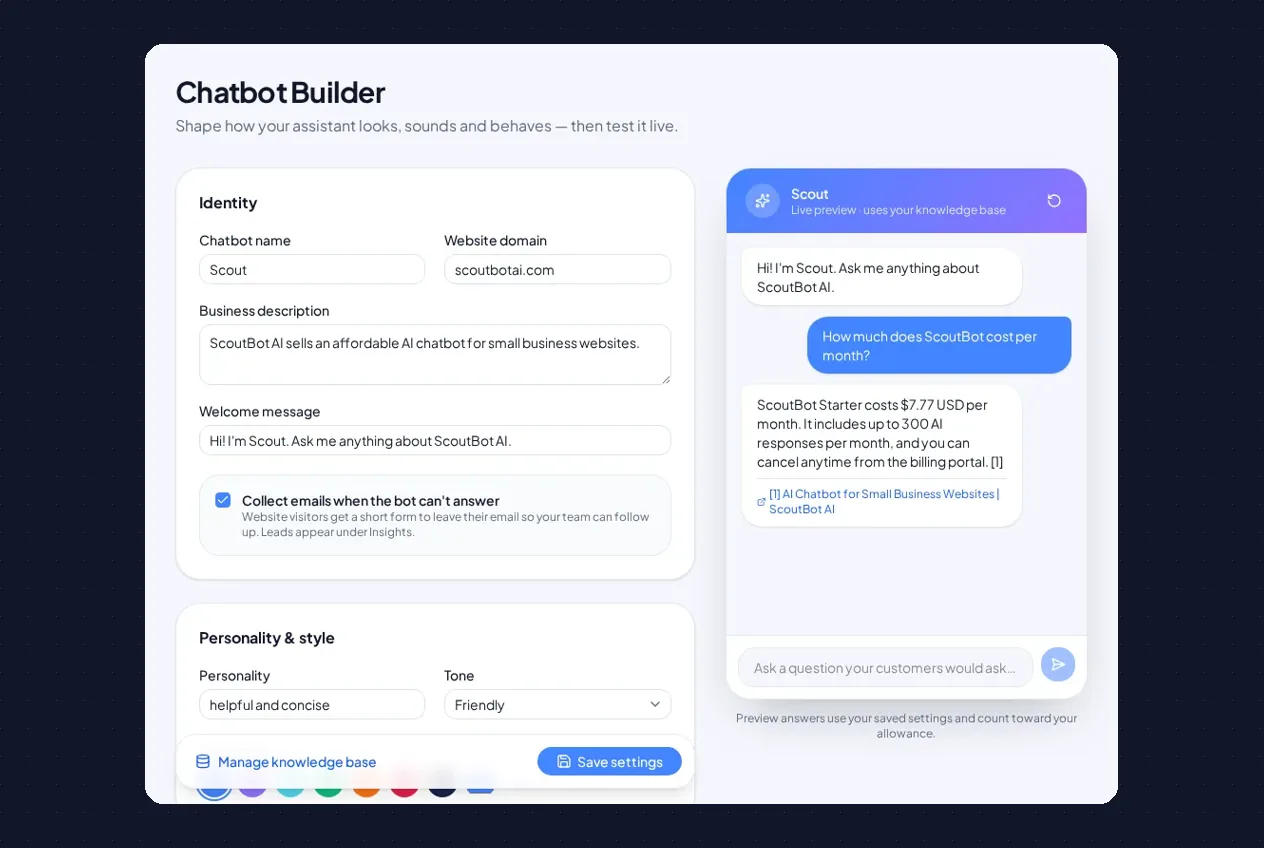
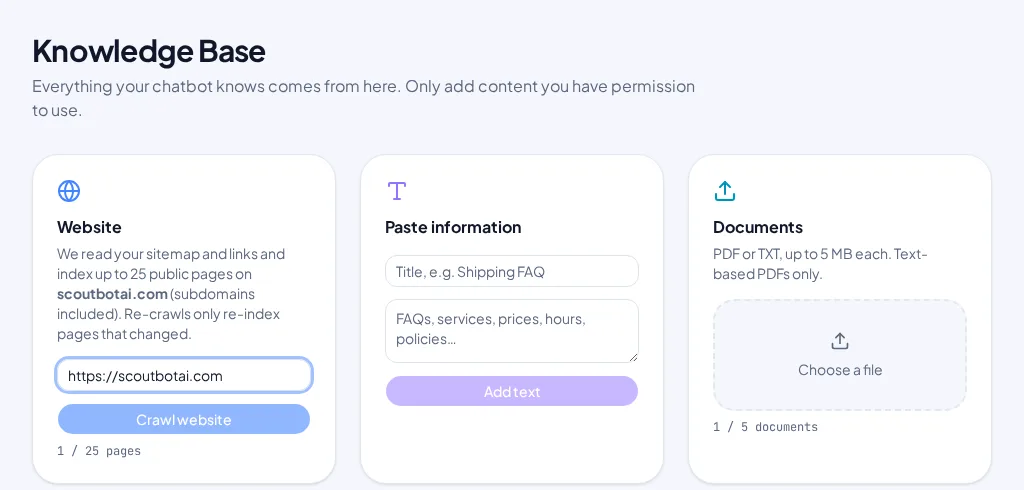
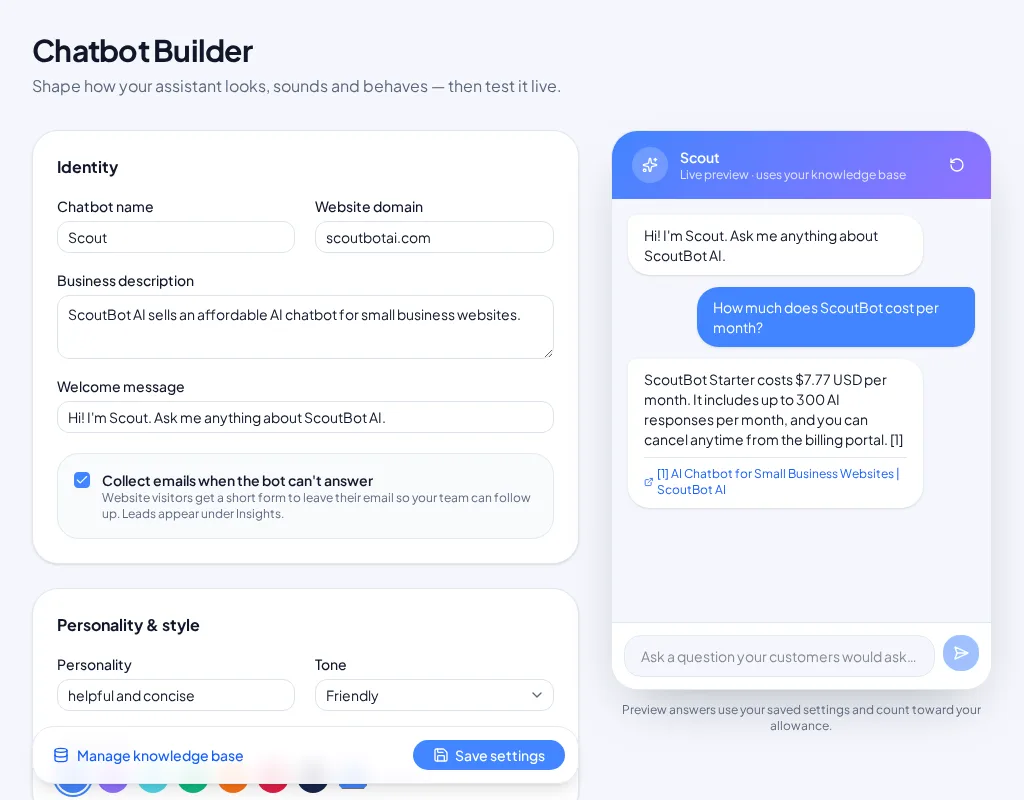
What it does. You connect your website and ScoutBot indexes up to 25 public pages from that domain. You can upload up to 5 PDF or TXT documents (text-based PDFs; scanned images can't be read) and paste extra answers as text. You set the assistant's name, welcome message, tone, personality and brand colour. Visitors get answers built from that content, with numbered links to the source page. You install it with one line of code, and it only responds on the domain you approve.
What happens when it can't answer. It says it doesn't have enough information rather than guessing, and can offer the visitor a short email follow-up form with a consent checkbox. The question appears in your dashboard so you can reply and add the answer to the chatbot's knowledge.
Pricing. ScoutBot Starter is $7.77 USD per month for 1 chatbot, 1 website domain and up to 300 AI responses, with answers capped at 500 tokens. New accounts get 20 free AI responses. When the allowance is used up, the chatbot pauses until it renews. There are no overage charges and no annual plan.
Limitations. No live chat with your staff, no phone, email or WhatsApp support, no order lookups, bookings or ticketing, and no CRM integrations. It's one chatbot for one website, and 300 responses a month won't cover a busy store.
Who it suits: small businesses, freelancers, service providers and small online shops whose common questions are answered on their website, and who don't need an enterprise support platform. Who should look elsewhere: businesses that need live agents, high message volumes, multiple chatbots or deep integrations.
Which chatbot is best for different types of businesses?
There's no single winner, but there are clear patterns. Match your situation to the row that fits best, then test the suggested tools with your own questions.
| Your situation | Good fit | Why |
|---|---|---|
| Local service business answering the same questions about areas, prices and availability | A website-trained assistant such as ScoutBot | Answers live on your site; low, fixed cost |
| Freelancer or consultant explaining packages and process | A website-trained assistant | Small number of pages, predictable questions |
| Small online store where staff also chat with shoppers | Tidio or another live chat platform with AI | Live chat, ecommerce integrations and AI in one inbox |
| Growing business expecting high AI volume or custom agent actions | Chatbase or a similar AI agent platform | Larger allowances, integrations and actions |
| Team running support across email, chat and social | A helpdesk or omnichannel platform | Ticketing, routing and reporting across channels |
Most small businesses start in the first two rows. If you're unsure, our guide to what to automate in customer service and what to keep human helps you work out which problem you're actually solving.
How much should a small business pay for a chatbot?
A useful way to think about cost is price per useful answer, not price per month. Divide the monthly price by the number of questions you expect it to answer correctly.
Cost per answer ≈ monthly price ÷ answers per month you expect it to handle
A hypothetical example: a hairdresser's website gets about 150 chatbot questions a month. On a $7.77 plan with 300 responses, that's roughly 5 cents per answer. On a plan priced at $150 a month, it's $1 per answer, which only makes sense if that plan gives the business something it needs, such as live chat or integrations. This is arithmetic, not a forecast of your results.
Three pricing details catch buyers out:
- Monthly vs annual billing. Many pricing pages show the annual-billing price per month by default. Chatbase Basic, for example, was $150 billed monthly or $120 per month billed annually when we checked. Annual billing saves money but commits you for a year.
- What counts as usage. One vendor counts AI responses, another message credits, another conversations. A conversation can contain several answers, and some actions use more than one credit.
- What happens at the limit. Does the chatbot stop, fall back to a contact form, or bill you for extra usage? A predictable bill matters more to a small business than a large allowance.
Common mistakes when choosing a chatbot
- Buying for features, not questions. Start with your last 30 customer questions, then check which tools answer them well.
- Not testing what happens when it doesn't know. Ask something your website doesn't cover. A good chatbot says so and offers a next step.
- Feeding it outdated content. Old price lists and expired offers produce wrong answers. Clean up your pages first.
- Ignoring the install path. Check whether your website builder allows custom code on your plan before you subscribe.
- Paying for live chat you won't staff. A live chat button with nobody answering is worse than a clear contact form.
- Never reading the conversations. The questions visitors ask are free research. Review them monthly.
How to get started with a website-trained chatbot
Whichever tool you choose, the setup follows the same pattern:
- List the 10–20 questions customers ask most, in their own words.
- Make sure the answers are on your website or in a document.
- Connect your website and add the documents to the chatbot.
- Ask every question from your list in the test preview and check the answers against your pages.
- Install the chatbot, then review conversations after the first week.
If you use WordPress, our step-by-step guide shows how to add an AI chatbot to WordPress without coding. For the wider strategy behind a small business chatbot, see our guide to AI chatbots for small business websites.
Frequently asked questions
What is the best AI chatbot for a small business website?
It depends on what you need. For answering common website questions from your own content at a low price, a focused website assistant such as ScoutBot AI fits. For live chat with staff, a platform like Tidio is designed for that. For high AI volumes or custom agent actions, a platform like Chatbase offers more. Test two or three with your real questions.
How much does an AI chatbot cost for a small business?
Prices range from free tiers with tight limits to hundreds of dollars a month. When we checked on November 25, 2026, ScoutBot Starter was $7.77/month, Tidio Starter $33/month and Chatbase Basic $150/month (or $120/month billed annually). Compare included usage, not only the price.
Is there a free AI chatbot for small business websites?
Some tools have free plans or trials with limits. Tidio has a free plan with a lifetime allowance of AI conversations, and ScoutBot gives new accounts 20 free AI responses. Free allowances are good for testing, but usually too small for a live website.
What's the difference between a chatbot and live chat?
Live chat connects visitors to a person on your team in real time. An AI chatbot answers automatically. Some platforms combine both. If nobody on your team can answer chats during the day, an AI chatbot with a clear contact route is usually the better choice.
Can an AI chatbot be trained on my website?
Yes. Website-trained chatbots read your public pages, and often your documents, and answer from that content. ScoutBot indexes up to 25 pages and 5 PDF or TXT documents and shows source links in its answers.
Do I need a developer to add a chatbot to my website?
Usually not. Most tools give you a code snippet to paste into your site's footer or custom code settings, or a plugin. Check that your website builder plan allows custom code.
Can a chatbot capture leads?
Many can. ScoutBot offers an email follow-up form with a consent checkbox when it can't answer, and the request appears in a leads inbox. Other tools offer lead forms, flows or live chat. Collect only what you need and explain why.
Will an AI chatbot give wrong answers?
It can, especially if your content is incomplete or out of date. Choose a chatbot that answers only from your content, shows sources and admits when it doesn't know, and test it before going live.
Is monthly or annual billing better?
Monthly billing is more flexible while you're testing; annual billing is cheaper per month if you're sure. Many pricing pages show the annual price by default, so check which one you're looking at.
Should I choose a chatbot with the most features?
Not necessarily. Unused features still cost money and add setup work. Choose the tool that handles your most common questions well and fits your budget, and upgrade only when you outgrow it.
Final recommendation
Start with your customers' questions, not with feature lists. If you need people to chat with customers live, choose a live chat platform with AI, such as Tidio. If you need high AI volumes, custom actions or several agents, an AI agent platform like Chatbase gives you room to grow. If you want a website assistant that answers common questions from your own pages and documents, with source links and a fixed low price, ScoutBot AI was built for exactly that, and you can test it with 20 free responses before deciding.
Sources
- Chatbase pricing (official, checked November 25, 2026)
- Tidio pricing (official, checked November 25, 2026)
- Tidio Live Chat plugin on WordPress.org
- Chatbase documentation: WordPress integration
- ScoutBot AI pricing
Product details reflect ScoutBot AI as of November 25, 2026. Pricing and limits are shown on the pricing section of our homepage.
Related article
 Best Chatbot Platforms for Small Businesses: 7 Tools ComparedCompare 7 chatbot platforms for small businesses. Explore AI features, website integration, pricing, usage limits and which chatbot software fits your needs.